

Imagine checking your Google Business Profile one morning and discovering that several customer reviews have disappeared. Your overall rating may have changed, or your total review count may be lower than it was last week.
For a local business, this can be frustrating. Customer reviews help potential customers evaluate a company before calling, requesting a quote, or visiting a location. Losing reviews can also make business owners question whether something is wrong with their Google Business Profile.
But a missing review does not automatically mean someone deliberately deleted it.
Google reviews can disappear because of policy enforcement, delayed publication, technical issues, changes involving Business Profiles, or other platform-related circumstances. Understanding the possible causes is the first step toward investigating the problem.
At Revolute X Digital, we recognize that review management is an important part of a broader local SEO strategy. In this guide, we explain how to find missing Google reviews, investigate why they disappeared, contact Google for assistance, and build a more reliable review management process.
Table of Contents
- Why Google reviews disappear
- How to find missing Google reviews
- How to report missing reviews to Google
- Can you recover deleted Google reviews?
- How to prevent future review problems
- Common mistakes to avoid
- Frequently asked questions
1. Why Do Google Reviews Disappear?
Before trying to recover a review, determine what might have happened. Google identifies several reasons why reviews may be missing from a Business Profile.
Google removed a review for a policy violation
Google reviews must follow its Maps user-generated content policies. Reviews that violate those policies may be removed.
Examples of prohibited content or behavior include:
- Fake reviews that do not reflect genuine customer experiences
- Paid or incentivized reviews
- Spam or repetitive content
- Promotional content
- Reviews posted to manipulate a business’s rating
- Content that is irrelevant or otherwise violates Google’s policies
Google uses automated systems and human review processes to identify policy violations. A review can therefore disappear even if a business owner did not report it.
Read Google’s official Maps user-generated content policies to understand the rules.
The review has not finished processing
Sometimes, a customer submits a review, but it does not appear immediately.
Google checks reviews for policy compliance, and this process can delay publication. Google notes that some reviews may take several days to appear.
If a customer recently submitted feedback, allow some time before assuming the review has been deleted.
Your Business Profile recently changed
Changes to a business location, ownership, or Business Profile setup can affect how reviews appear.
For example, if a business moves or inadvertently creates and verifies a new profile, its reviews may not immediately appear as expected.
Google advises businesses experiencing review issues after a profile reinstatement or certain profile changes to contact support for assistance.
Google temporarily restricted reviews
In some circumstances, Google may temporarily disable user-generated content for particular profiles or business categories to protect against abuse.
A sudden decrease in review activity does not necessarily mean your business has done something wrong.
If you notice a broader change, check your Business Profile notifications and Google’s official help resources before taking action.
A technical or display issue is involved
A review might not appear as expected because of a temporary display issue, an outdated application, or another technical problem.
Google also notes that customers using older phones or software may experience difficulties when submitting reviews.
If a customer says a review was published but cannot find it, ask them to check their own Google Maps contributions and confirm whether the review is still visible to them.
Important: Google does not provide a public tool that guarantees recovery of every missing review. First establish whether the review is delayed, removed, or associated with a profile-related problem.
2. How to Find Missing Google Reviews
If your Google review count has dropped, follow these steps before contacting support.
Step 1: Check your current review count
Open Google Search or Google Maps and locate your business’s verified Google Business Profile.
Record the current:
- Total number of reviews
- Overall star rating
- Most recent visible reviews
- Any available notifications concerning reviews or policy enforcement
Compare this information with previous records, screenshots, or reports.
Remember that the displayed rating and review count may not always update at exactly the same time. A change in the number alone does not prove that a specific review was deleted.
Step 2: Ask the customer to check their review
If you know which customer submitted the missing review, politely ask them to check their Google Maps profile.
They can open Google Maps, select their profile, and review their contributions to find the review they submitted.
Ask them to confirm:
- Whether the review is still visible in their contributions
- Approximately when they submitted it
- Whether they received any relevant notification
- Whether they can still see the review on your business listing
This helps you distinguish a missing review from a review that was never successfully published.
Do not ask the customer to create multiple accounts or repeatedly repost the same review. That can create additional policy problems.
Step 3: Check whether multiple reviews disappeared
Look for patterns.
Did one review disappear, or did several reviews disappear around the same time?
For example:
- One recent review is missing.
- Several reviews disappeared over a few days.
- The total review count dropped after a profile change.
- New reviews have stopped appearing.
- Reviews disappeared after a Business Profile reinstatement.
These patterns can help you explain the problem when contacting Google.
They do not, by themselves, prove the reason for the missing reviews.
Step 4: Review your Business Profile status
Check your Google Business Profile for notifications or issues involving verification, reinstatement, policy compliance, or profile changes.
If the profile was recently suspended and reinstated, or if you changed its location or ownership, mention that information when seeking support.
Avoid making unnecessary profile changes while investigating. Focus on documenting the issue first.
Step 5: Gather evidence
Before opening a support request, prepare a short record of what happened.
Useful information includes:
- Business name and Google Business Profile ID
- Number of missing reviews
- Approximate date the reviews disappeared
- Reviewer names, where known
- Dates the reviews were submitted, where known
- Screenshots of earlier review records, if available
- Relevant Google support case numbers
- Whether new reviews are still appearing
- Any recent profile changes
You do not need every item to start an investigation, but a clear timeline and specific examples can make your request easier to understand.
3. How to Report Missing Google Reviews to Google
If your investigation suggests that genuine reviews have disappeared unexpectedly, contact Google Business Profile support.
Google’s review troubleshooting guidance recommends reporting missing reviews and providing details that help its support team investigate.
Follow these steps:
- Sign in to the Google account that manages your Business Profile.
- Open the Google Business Profile Help Center.
- Find the contact or support option available for your issue.
- Select the relevant business profile.
- Explain that customer reviews are missing.
- Provide the review count, approximate dates, reviewer names, and other supporting details.
- Attach screenshots if you have them.
- Save your support case number and any responses.
Be specific. Instead of writing, “Google deleted my reviews,” describe what you observed and ask the support team to investigate.
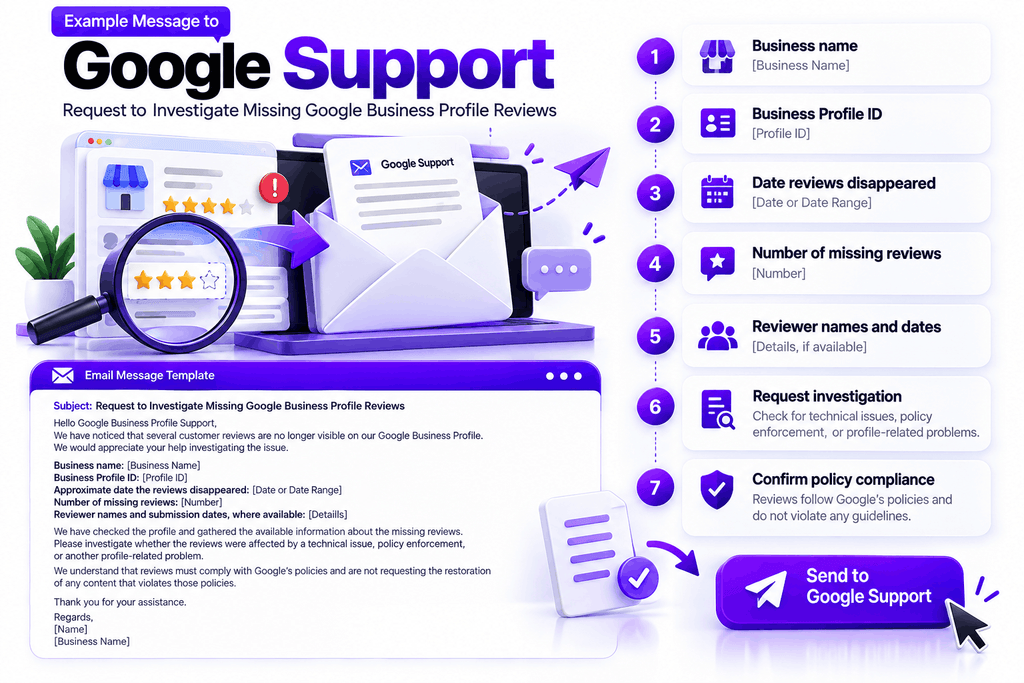
Example message to Google Support
Subject: Request to Investigate Missing Google Business Profile Reviews
Hello Google Business Profile Support,
We have noticed that several customer reviews are no longer visible on our Google Business Profile.
We would appreciate your help investigating the issue.
Business name: [Business Name]
Business Profile ID: [Profile ID]
Approximate date the reviews disappeared: [Date or Date Range]
Number of missing reviews: [Number]
Reviewer names and submission dates, where available: [Details]
We have checked the profile and gathered the available information about the missing reviews. Please investigate whether the reviews were affected by a technical issue, policy enforcement, or another profile-related problem.
We understand that reviews must comply with Google’s policies and are not requesting the restoration of any content that violates those policies.
Thank you for your assistance.
Regards,
[Name]
[Business Name]
What happens after you contact Google?
Google will need to evaluate the issue. You may receive a request for additional information or an explanation of the outcome.
Submitting a support request does not guarantee that a review will be restored.
If a review was removed because it violated Google’s policies, Google states that such reviews will not be restored.
4. Can You Recover Deleted Google Reviews?
The answer depends on why the review disappeared.
| Situation | Recommended action |
|---|---|
| Review is delayed | Allow time for processing and check again |
| Review disappeared unexpectedly | Document the issue and contact Google support |
| Profile recently changed | Explain the change when contacting support |
| Review was removed for a policy violation | Do not expect restoration |
| Customer cannot find their submitted review | Ask them to check their Google Maps contributions |
| Review disappeared after profile reinstatement | Contact Google support for assistance |
The most important distinction is between a review that is missing unexpectedly and one that Google removed for a policy violation.
If a review was removed in error, contacting support is the appropriate next step. However, business owners cannot directly restore reviews through a simple recovery button.
If the review was legitimately removed under Google’s policies, the better approach is to continue earning genuine customer feedback through a compliant process.
Never pay for replacement reviews or offer discounts in exchange for positive ratings. Google prohibits incentivized reviews and rating manipulation.
5. How to Protect Your Business Reputation From Future Review Problems
You cannot guarantee that every legitimate review will remain visible forever. However, you can build a review management process that helps you detect issues and maintain a steady flow of authentic customer feedback.
Create a consistent review request process
Ask customers for honest feedback after a genuine interaction with your business.
For example, a contractor might send a review request after completing a project, while a professional service provider might ask after delivering the agreed service.
Keep requests neutral. Customers should be free to leave positive, neutral, or negative feedback.
Google permits businesses to request reviews based on genuine experiences, but it prohibits incentives and attempts to manipulate ratings.
Make leaving a review easy
Use the review link provided through your Google Business Profile.
You can share it through appropriate customer follow-up emails, receipts, or messages.
Avoid pressuring customers, asking only satisfied customers to leave public reviews, or offering rewards for a particular rating.
Monitor your review count regularly
Review your Google Business Profile on a consistent schedule.
A weekly check may be sufficient for some businesses, while companies receiving many reviews may benefit from more frequent monitoring.
Record notable changes so that you can identify when a problem began.
Keep basic review records
Maintain a simple internal log containing:
- Date a review was noticed
- Reviewer name, where publicly available
- Review count at the time
- Whether the review was visible
- Support case number, if applicable
- Resolution or follow-up date
This does not guarantee that reviews can be recovered, but it makes unusual changes easier to document.
Respond professionally to customer feedback
Respond to reviews in a timely, respectful manner.
Thank customers for their feedback and address legitimate concerns without disclosing private information.
Professional responses show prospective customers that your business takes feedback seriously, even when a review is critical.
Integrate reviews into your local SEO strategy
Reviews are one part of local search visibility, not the entire strategy.
A stronger local SEO program also considers Google Business Profile accuracy, relevant website content, technical SEO, local relevance, business information consistency, and the overall customer experience.
At Revolute X Digital, we recommend treating review monitoring as one component of a broader local SEO and reputation management process.
6. Common Mistakes to Avoid When Google Reviews Disappear
When reviews disappear, avoid making the situation worse.
Do not immediately assume Google penalized your business. A missing review can have several explanations.
Do not ask customers to post the same review repeatedly. First establish whether the original review was published and why it is missing.
Do not purchase replacement reviews. Paid or incentivized reviews violate Google’s policies.
Do not offer discounts for positive reviews. Customers must be able to provide honest feedback without incentives tied to ratings.
Do not create multiple Business Profiles to recover reviews. Unnecessary duplicate profiles can create additional problems.
Do not rely only on your star rating. Review counts, customer feedback, business information, and conversion data all provide useful context.
Do not assume every missing review can be restored. Google’s decision depends on the circumstances and its policies.
Final Thoughts
Missing Google reviews can be frustrating, especially when your business has invested time in delivering good customer experiences and building a strong reputation.
The best response is to investigate before making assumptions.
Check the current review count, ask customers to verify their submissions where appropriate, look for patterns, document the issue, and contact Google Business Profile support if necessary.
At the same time, maintain a consistent and policy-compliant review process. Encourage honest feedback, respond professionally, and monitor your online reputation as part of your wider local SEO strategy.
Revolute X Digital helps businesses strengthen local search visibility through Local SEO, Google Business Profile optimization, and broader digital marketing strategies. If missing reviews are part of a larger local visibility problem, reviewing your overall local SEO setup may help identify other areas that need attention.
Need help with your local search presence? Visit Revolute X Digital to learn more about our digital marketing services.

Zack
Zack Robinson is a Digital Marketing Specialist at Revolute X Digital, specializing in SEO, Local SEO, Google Business Profile optimization, AI automation, and lead generation. He helps businesses improve their online visibility, attract qualified customers, and achieve sustainable growth through data-driven digital marketing strategies.